
Payroll and benefits for Ghanaian employers ↗

Pay your team. File with GRA and SSNIT. Done.

Benefits Payroll works out PAYE and SSNIT for every employee, pays them by MoMo or bank, files your monthly returns and keeps the receipts. You can also offer benefits like Earned Wage Access and Rent & Pay.
Set up for your businessContact Us ↗
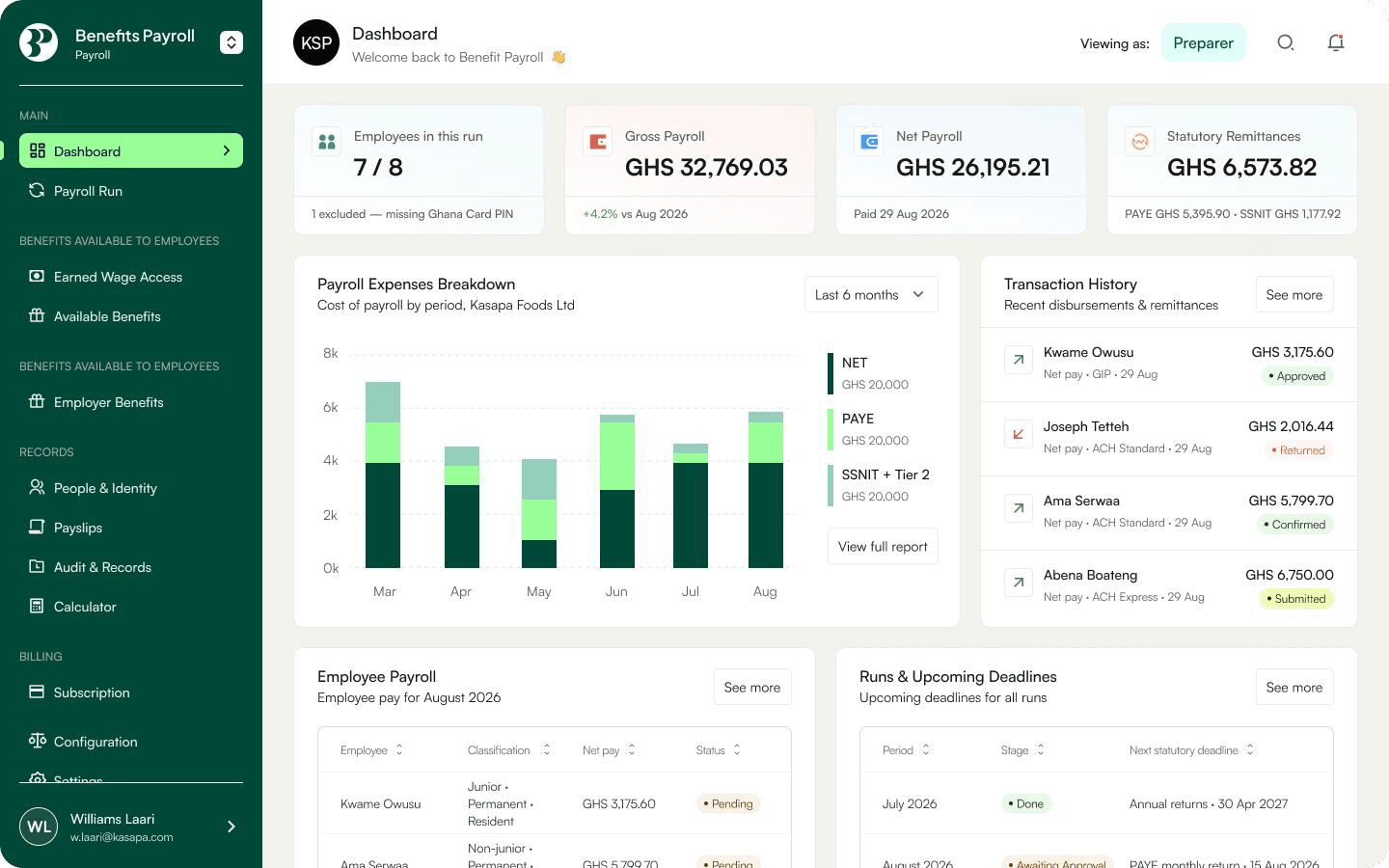
Benefits Payroll dashboard
✓2026 GRA tax bands built in
✓SSNIT Tier 1, 2 and 3
✓MTN, Telecel and all major banks
SSNIT & Tier 2 - 14 Nov9 days
GRA PAYE 15 Nov10 days
Next deadlines · October payroll
SSNIT & Tier 2 - 14 Nov9 days
GRA PAYE 15 Nov10 days
Next deadlines · October payroll
SSNIT & Tier 2 - 14 Nov9 days
GRA PAYE 15 Nov10 days
Next deadlines · October payroll
SSNIT & Tier 2 - 14 Nov9 days
GRA PAYE 15 Nov10 days
Next deadlines · October payroll

Everypayperiodrunsthroughthesamefivesteps,inorder.Nothinggetspaiduntilanapproversignsoff,somistakesgetcaughtbeforepayday.

Why employers switch to Benefits Payroll

No more spreadsheets

Every figure, right

PAYE bands, SSNIT, overtime and bonus concessions, benefits-in-kind and reliefs are worked out for you.

No more bank queues

Staff paid in minutes

Pay by MoMo or bank from one balance. Account names are checked before any money moves.

Take care of your team

Employee benefits

Employees can rent, buy items and finance their cars and pay monthly, or access part of their salary ahead of payday.

How it works

One month, five steps,
no spreadsheets.
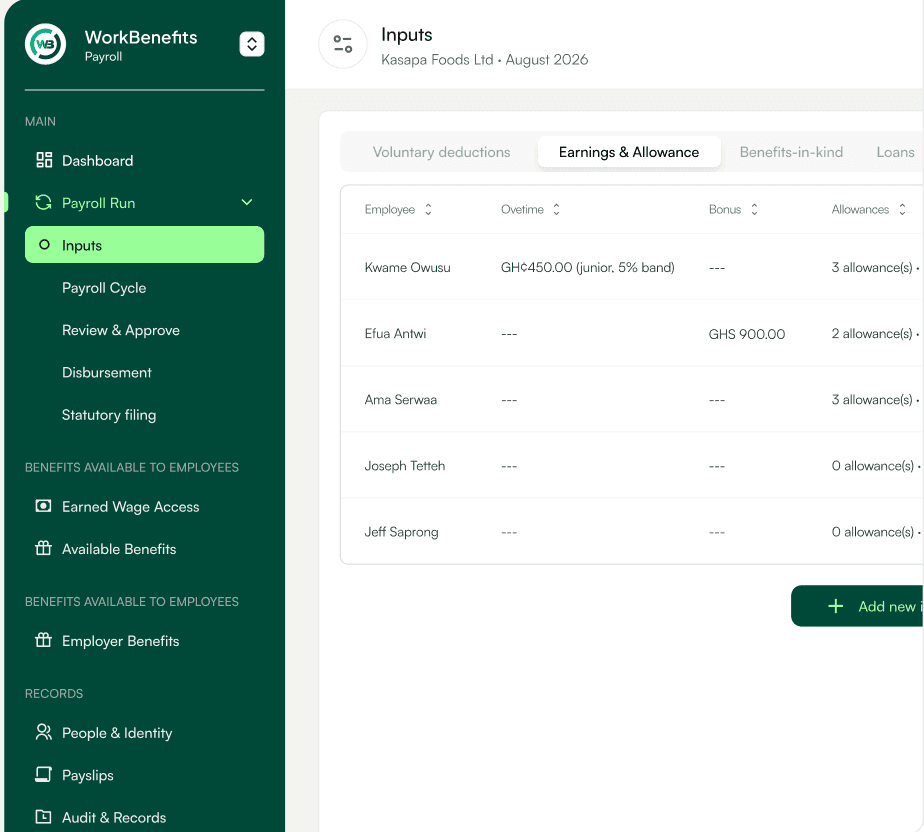
01 · Inputs
Add this month's extras
Overtime, bonuses, arrears, allowances, staff loans, benefits-in-kind and tax reliefs, entered per employee or for many at once.
➤Junior overtime and bonus concessions applied for you
➤Loan benefits worked out at the Bank of Ghana rate
➤Voluntary deductions that repeat every month
02 · Calculate
Draft, check, repeat
PAYE and SSNIT are worked out for every employee using the 2026 GRA bands. Re-run the draft as often as you need.
➤2026 GRA tax bands built in
➤SSNIT Tier 1, 2 and 3
03 · Approve
A second pair of eyes
Nothing gets paid until an approver signs off, so mistakes get caught before payday.
➤Approved runs are versioned and locked
➤Every sign-off kept in the audit trail
04 · Pay
MoMo and Bank
Net pay goes to your team by MoMo or bank, and statutory amounts to the authorities.
➤Payout Account, direct debit or bank file
➤Failed payments come back to you
05 · File
PAYE and SSNIT
Returns are generated from your approved run, uploaded to GRA and SSNIT, and every receipt is stored against the run.
➤SSNIT and Tier 2 by the 14th
➤GRA PAYE by the 15th
Inputs
Calculate
Approve
Pay
File
Inputs screen
Compliance

We file PAYE and SSNIT, so the 14th and 15th stop being scary.

Connect your GRA and SSNIT portals once. Each month we generate the returns from your approved run, upload them, pay from your Payout Account and keep every receipt against the run, with a full audit trail behind every run.

Of the following month
14th
SSNIT Tier 1 (13.5%) and Tier 2 (5%)
to SSNIT and your trustee
15th
PAYE monthly return
filed and paid to GRA
End
Tier 3 (voluntary)
to your provider
Every deadline, on one calendar
What gets paid, to whom, and when.
Next SSNIT run in 8d 7h.
Payroll run
October 2026
Approved
Generatedfrom the approved run
Uploadedto the GRA and SSNIT portals
Paidfrom your Payout Account
Receipts keptattached to the run
PAYE
Receipt
SSNIT T1
Receipt
Tier 2
Receipt
Returns generated from your approved run
Uploaded, paid from your Payout Account, receipts kept.
PAYE bands2026 rules live
0%
5%
10%
17.5%
25%
30%
35%
Rules kept current
PAYE bands, SSNIT ceilings, benefit-in-kind rates and reliefs are updated for you when GRA and SSNIT change them.
Old runs stay correct
Every run keeps the rules that applied at the time, so a reprint always matches what was filed.
Payouts

Salaries land in minutes,
by MoMo or bank.

Choose how you fund each run. Every option sends net pay to your team and statutory amounts to the authorities.

MTN MoMo
Telecel Cash
GCB
Stanbic
Ecobank
Absa
Fidelity
CalBank
and more
Payout Account
Recommended
Top up one balance. The approved run pays itself, and every payment reconciles back to the run automatically.
Straight from your bank
Direct debit
Connect your corporate account. Your bank checks every account name, quotes the charges, and nothing moves until you confirm. Stanbic is live now.
Bank file
Manual
Prefer your bank portal? Export an Excel or CSV file and upload it yourself. We keep a history of every file.
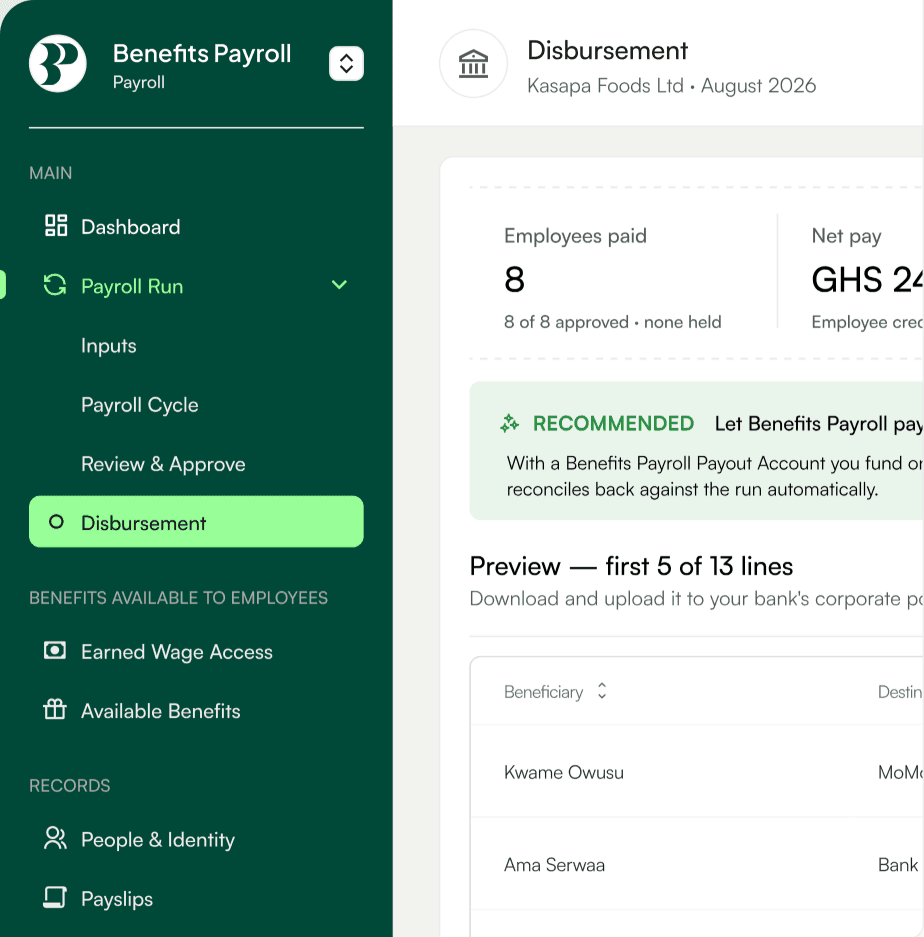
Disbursement screen

See every cedi arrive

Track each payment as Paid, In transit or Failed. If a bank returns one because of a name mismatch, the money comes back to you. Fix the details and retry in one click.

Benefits

Benefits your team will actually use.

Switch on benefits in a few clicks. Repayments come out through payroll automatically, so there's nothing extra to chase.
Coming soon Group health and life cover
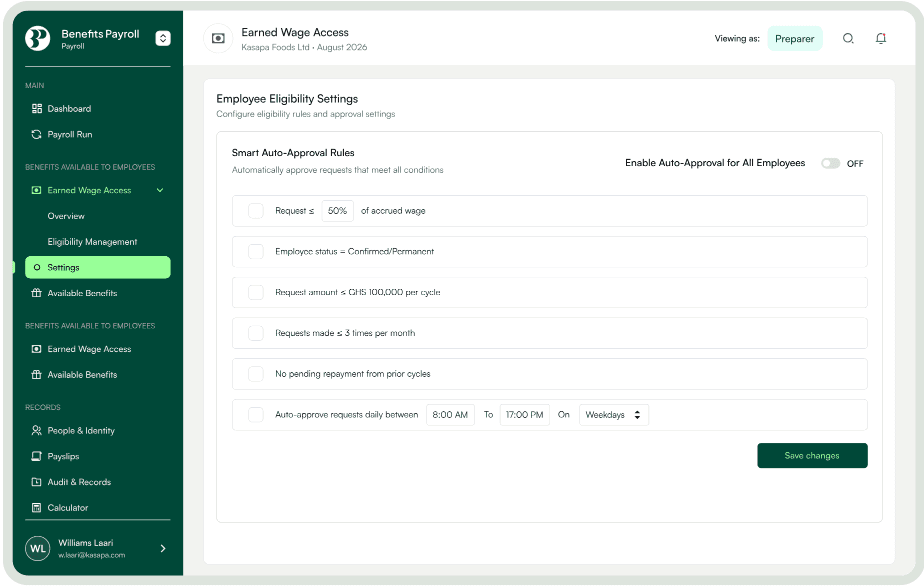
Earned Wage Access

Staff can draw up to 50% of what they've already earned before payday. You set the limits. It's deducted from the next payroll.

Earned Wage Access settings
Pricing

Simple monthly pricing.

One flat fee covers your first 30 employees. After that you pay per extra employee. Unlimited payroll runs on every plan.

Silver
● Most popular
GHS 1,200/ month
Flat fee · covers your first 30 employees
Choose Silver
EmployeesPer employee / month
31–100GHS 25
101+GHS 15
You have 42 employees → GHS 1,500 / month
✓Unlimited payroll runs each month
✓Payslips, disbursement and audit records
✓PAYE and SSNIT calculated on every run
✓Statutory returns prepared for you to file
Gold
GHS 1,500/ month
Flat fee · covers your first 30 employees
Choose Gold
EmployeesPer employee / month
31–100GHS 30
101+GHS 20
You have 42 employees → GHS 1,860 / month
✓Everything in Silver
✓Benefits Payroll files your PAYE and SSNIT returns
✓Filing receipts stored against each run
✓A dedicated support contact
FAQs

Questions
employers ask.

Not covered here? Our team in Accra can walk you through your first run.

Talk to us
Yes. Create your account, add your company details and import your people while we check your TIN and SSNIT employer number with GRA and SSNIT, usually within one working day.

Run your next payroll on
Benefits Payroll.

Create your employer account now. You'll verify your company and import your people in the next steps.

Set up for your business

Register today. Run payroll this month.

1. Create your account
Company name, headcount and your work email. About 1 minute.
2. Import your people
Upload last month's PAYE schedule and HR file. We match everyone.
3. Run payroll
Click to run payroll. The system crunches the numbers.
Benefits Payroll
All Rights Reserved.
© 2026 Benefits Payroll
A Renmo product